

Does someone who left still have SAP access?
I built a tool that compares the company directory with SAP. The team can review accounts left active, missing roles and differences in contact details. Locking an SAP account requires selecting it and confirming the action.

Which accounts did SAP lock?
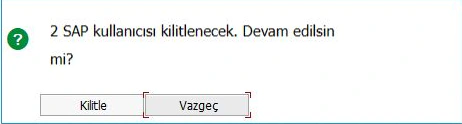
The SAP report flags accounts that are still active in SAP after being disabled in the company directory. Here the reviewer has selected two SAP accounts. Follow the confirmation prompt and the two results in the report.
Leave the decision to the reviewer
In this example SAP asks for confirmation before locking two accounts. The reviewer can proceed or cancel.
 ABView full size ↗
- ASAP asks the reviewer to confirm that two accounts will be locked.
- B“Kilitle” (Lock) applies the action to the selected SAP accounts.
Check what actually happened
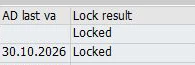
In the locking test, two rows show “Locked”. The confirmation dialog described the proposed action; this column records the result in SAP.
 AView full size ↗
- ABoth rows read “Locked”. SAP locked both selected accounts.
Find the difference before acting
Compare the accounts
The report matches SAP users against the company directory. It distinguishes a disabled account from one that could not be found.
Review the selection
The initial comparison produces a report. If locking is selected, the reviewer confirms the scope in SAP. The directory account itself stays as it was.
What I built
- Find accounts left active
- I compare disabled or expired directory accounts with active SAP users. Accounts with no directory match appear separately for review.See which accounts need a review
- Compare group membership with SAP roles
- My report shows both people in a directory group who lack the SAP role and people with the role who are outside the group.When a group and a role cover different people
- Compare contact details
- I added a view that compares email, phone, department and job title between SAP and the company directory, alongside a directory search.What does each system say about the same person?
- Make locking a separate decision
- After reviewing the findings, the operator can select and confirm the affected accounts. Locking applies to the selected SAP accounts.Check what actually happened
From the test screens
See which accounts need a review
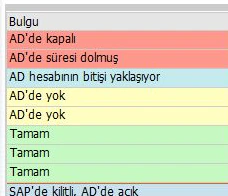
A disabled directory account and a missing one are different findings. The list makes those differences visible for review.
 ABView full size ↗
- A“AD’de kapalı” means the account was found in the directory and is disabled.
- B“AD’de yok” means SAP could not find a matching directory account.
When a group and a role cover different people
The findings show both directions. Some people belong to the group but lack the role. Others hold the role without group membership. Each finding tells the reviewer which side to investigate.
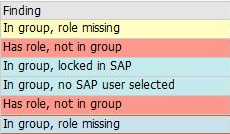 ABView full size ↗
- A“In group, role missing” flags a group member who lacks the SAP role.
- B“Has role, not in group” flags someone who holds the SAP role but is outside the group.
What does each system say about the same person?
In this SAP test screen, the middle column shows the SAP record and the right column shows the directory record. The team can see which details differ and which are missing.
 ABView full size ↗
- AThe same person's department is Finance in SAP and Accounting in the directory.
- BThe job title is blank in SAP. The directory lists Senior Specialist.